


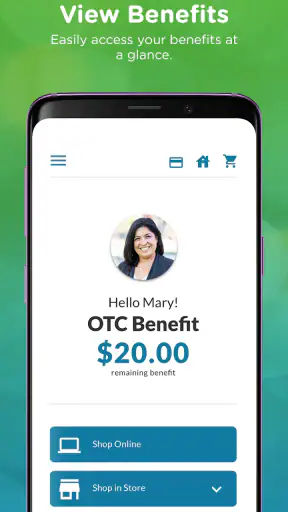
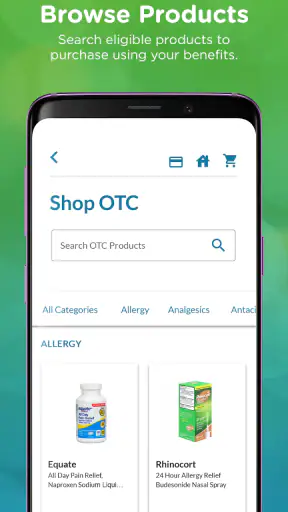
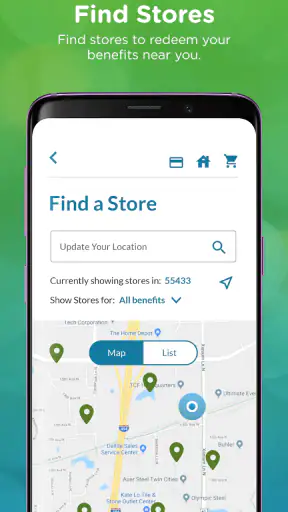
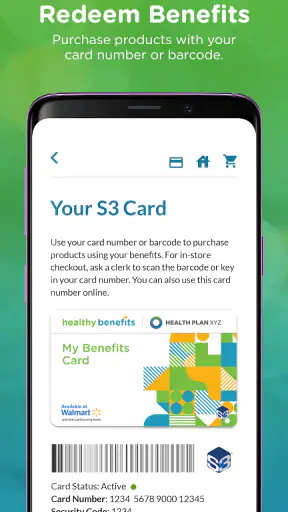
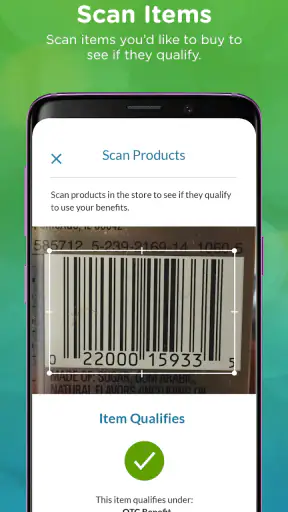
Healthy Benefits+ (Classic) is the kind of medical app I would install when my health plan has pointed me toward benefit spending or rewards and I want one place to understand what I can use. It is free, rated for Everyone, and developed by Solutran, Inc. My first impression is that it is more useful as a practical benefits companion than as a general health tracker. It does not try to replace a doctor, a pharmacy app, or a fitness platform. Its value comes from helping eligible users access the benefits connected to their plan without carrying every detail in their head.
The important word here is “eligible.” This is not an app that becomes equally useful for every person who downloads it. Your experience depends on whether your health plan participates and which benefits are attached to your account. That makes the first few minutes especially important: the app can be worthwhile once your account is recognized, but it can feel limited if you expected a universal wellness service. I recommend approaching it as a doorway to plan-specific benefits, not as a standalone medical solution.
What to expect before you begin
The app has been available since December 21, 2018, and its current version is 4.8.0. It supports devices running Android 8.0 or later. Those details matter mainly because an older phone may need an operating-system update before installation works smoothly. On a compatible device, the download itself is free, so there is no purchase decision to make before you test whether the service fits your plan.
Healthy Benefits+ has passed one million installs and holds a 3.6 average from roughly 133 thousand ratings. I read that combination as a sign of a widely used but not universally effortless service. A large audience means the app is familiar to many plan members, while the middle-of-the-road average suggests that access, account recognition, or individual benefit rules can affect satisfaction. I would not judge it only by the score; I would judge it by whether it connects to your specific coverage and makes a real task easier.
The store describes it as a way to get easier access to benefits and rewards, and that is a fair expectation. I would not install it hoping to receive diagnosis, emergency guidance, appointment treatment, or a complete record of every medical interaction. For those jobs, a provider portal, pharmacy service, insurer website, or direct conversation with a clinician is usually more appropriate. This app sits in a narrower space: helping you use the benefits your plan makes available.
Before opening it, keep the information associated with your health-plan enrollment nearby. I do not recommend guessing through registration screens or creating several accounts because you are unsure which details belong to the plan. A careful first attempt is generally better than repeatedly entering variations of your name or contact information. If the app cannot identify your benefits, that is the moment to check the plan materials or contact the support channel connected with your coverage rather than assuming the app itself is broken.
The first setup should be treated as an eligibility check
After installation, I would start by looking for the sign-in or registration path intended for existing members. The goal is not simply to reach the home screen; the goal is to confirm that the app has found the right benefit account. Take a moment to compare the personal details shown in the app with the information on your plan documents. If something looks unfamiliar, stop before trying to use a benefit. A mismatch can lead to confusion later, especially when you are trying to understand what is available or where a reward belongs.
The most reassuring way to set it up is to move slowly and read each screen rather than tapping through automatically. Plan-linked apps often use language that makes sense to administrators but feels vague to ordinary users. If you see a benefit name you do not recognize, do not assume it is a cash balance, a medical reimbursement, or a general discount. Treat each item as a plan-specific entitlement whose rules need to be understood inside the app or through the plan’s support resources.
Once the account is recognized, explore the main areas before attempting a purchase or redemption. I look for three things first: where the available benefits are displayed, where instructions or terms can be reviewed, and where help is located. Doing this early prevents a common mistake: reaching checkout or a retailer visit and only then discovering that the benefit has conditions. The app is more useful when you use it as a planning tool instead of opening it at the last second.
One practical habit is to take a mental note of the benefit period and any wording about eligible products or participating locations. I am deliberately not treating every visible balance as spendable money. In a benefits app, the amount, category, timing, and eligible use can all matter. If an item appears available, read the surrounding details before building your shopping plan around it. That small pause can save you from choosing products that look health-related but do not qualify under your plan.
How to reach the first meaningful success
For a first-time user, the best initial goal is modest: successfully identify one benefit you can use and understand the next action required. Do not begin by browsing everything. Open the benefit area, choose the clearest available option, and read its instructions from beginning to end. I consider the setup successful when I can answer three questions: what is available, what kind of use is allowed, and what I need to do next.
A realistic example would be someone preparing for a regular household shopping trip. Instead of waiting until the checkout line, I would open Healthy Benefits+ at home, review the benefit details, and make a short list based on the app’s instructions. At the store, I would keep the app available for reference and check the final items against the stated eligibility before paying. The important workflow is not merely finding a balance; it is connecting the balance to a sensible plan and avoiding assumptions.
This is where the app can be more convenient than paper benefit documents. A printed guide may explain the program, but it is easy to misplace and often requires you to remember which section applies to you. A general insurer website may contain more background information, but it can take longer to navigate on a phone. Healthy Benefits+ is most helpful when you already know that your plan offers a relevant benefit and want a focused way to reach it.
My advice is to complete one small action before exploring rewards or secondary sections. Confirming your account, reading one benefit’s rules, and using that information for a real decision gives you a much clearer sense of the app than scrolling through every menu. It also exposes problems early. If the first benefit does not match your expectations, you can investigate while you still have time rather than discovering the issue during an urgent purchase.
If the app displays a reward or benefit that seems to have changed, compare the wording with your current plan information. Do not rely on an old screenshot, a friend’s experience, or a previous enrollment period. Two people can use the same app and see different options because their plan arrangements differ. That is one of the central trade-offs here: the app can be more relevant than a generic health service, but it is also less predictable for someone who expects every screen to apply universally.
Confusion points that can slow you down
The first common confusion is the difference between the app and the underlying benefit program. Healthy Benefits+ is the access point, while the actual eligibility and rules come from the plan connected to your account. If you cannot see a benefit, that does not automatically mean the app has failed. It may mean the benefit is not part of your coverage, the account has not been matched correctly, or the service needs you to complete a different enrollment step. I would verify the account before deleting and reinstalling the app.
The second confusion is assuming that “rewards” and “benefits” work in exactly the same way. The wording may be appealing, but I would inspect each section separately. A reward can have its own conditions, while a health-related allowance may have product or timing restrictions. Treating them as interchangeable is an easy way to misunderstand what you can use. The safest approach is to follow the instructions attached to the specific item rather than applying rules from another section.
A third friction point is expecting the app to explain every medical question. Its category is Medical, but that label does not make it a clinical advice service. I would not use it to decide whether a symptom is serious, whether a prescription is appropriate, or whether urgent care can wait. For those decisions, a qualified healthcare professional is the right source. The app’s medical relevance is administrative and benefit-oriented, not a substitute for care.
Another issue is the gap between seeing an option and feeling ready to use it. An app can show an available benefit without making the practical details instantly obvious. This is why I recommend reading the instructions before shopping, saving the support route somewhere accessible, and asking questions before a deadline or appointment creates pressure. If a family member helps you manage benefits, walking through one example together can be more effective than sending them a login and expecting them to understand the account immediately.
Privacy and account safety also deserve ordinary caution. I would use the app on my own device or a trusted one, avoid sharing sign-in details casually, and sign out when using a shared phone. That is not a criticism unique to this service; it is simply sensible for an app connected to health-plan information. If something looks wrong, I would contact the official support option associated with the account rather than relying on an unofficial message or a random web result.
Where it beats the usual alternatives
Compared with a paper booklet, Healthy Benefits+ is easier to carry and potentially easier to consult while planning a purchase. Compared with a broad insurer portal, it can feel more direct because its purpose is centered on benefits and rewards instead of every possible insurance task. Compared with a general wellness app, it offers something those apps normally cannot: a connection to plan-specific access. That distinction is the reason to install it.
It is not automatically better than every alternative. If your insurer’s main app already gives you a clearer view of the same benefits, using one established portal may be simpler than maintaining another login. If you prefer speaking with a representative, the app may not reduce your need for support when eligibility is complicated. And if you are looking for exercise tracking, nutrition coaching, symptom monitoring, or medication reminders, a dedicated health app will likely be a better match.
The strongest use case is someone who has been told that their plan includes benefits or rewards and wants a convenient way to check and act on them. The weakest use case is someone downloading it without a participating plan or expecting a complete personal-health dashboard. In that situation, the app may create more questions than value. I would confirm that Healthy Benefits+ is the service associated with your coverage before investing time in setup.
My practical routine after setup
Once the account works, I would avoid opening the app only when I am already at a store or facing a deadline. A better routine is to check the account before planning a relevant errand, review the instructions for the particular benefit, and then confirm the result afterward. This turns the app into a small planning step rather than an emergency reference. It also gives you a chance to notice changes in what is displayed before they affect your decision.
For households, the useful workflow is to separate “what we have” from “what we intend to use.” I would first review the available benefit, then make a list, then verify that the list follows the app’s rules. Keeping those steps separate reduces impulse decisions and makes it easier to explain the process to another person. If a caregiver or relative assists you, this structure can also reveal exactly where help is needed: account access, understanding eligibility, or completing the final action.
Another non-obvious advantage is that the app can help you decide whether a benefit is worth the effort before you travel. If the instructions are too restrictive for your needs, you can choose another option or ask for clarification in advance. That is better than treating every available item as equally useful. The presence of a benefit does not guarantee that it fits your household, location, schedule, or shopping habits.
At the same time, I would keep a backup plan. Technology can be inconvenient at the exact moment you need it, and a phone battery, connection, login issue, or unclear instruction can interrupt a transaction. Keeping your plan information accessible and knowing how to reach official support makes the app less stressful. I see Healthy Benefits+ as a convenience layer, not something that should be your only source of information about coverage.
The app has around 21 thousand written reviews, which tells me that many users have had enough experience to comment beyond a quick rating. I would still interpret individual complaints carefully because an account-specific eligibility problem can look like a general app problem. Before deciding that the service is unusable, I would check whether the issue is with registration, the benefit rules, or the phone itself. That simple diagnosis often points to a faster solution.
Who should install it, and who should skip it
I would recommend Healthy Benefits+ to a plan member who wants a focused way to reach eligible benefits and rewards, especially someone who dislikes sorting through paper instructions or a large insurance website. It is also a reasonable choice for a caregiver who needs a practical view of the benefits connected to another person’s plan, provided the account access is handled properly. The free price makes trying it low-risk when you already know your coverage is supported.
I would skip it if you are seeking medical advice, a symptom checker, a medication database, or a complete record of clinical care. I would also skip it if you have no reason to believe your plan uses this service. Installing a plan-specific app without a matching account is unlikely to produce the same useful experience shown in demonstrations or reviews. In that case, your insurer’s normal customer-service route is a better first step.
My final view is positive but practical. Healthy Benefits+ (Classic) is not exciting software, and it does not need to be. Its success depends on making a narrow, important task less confusing: finding and using the benefits attached to your health plan. The first meaningful win is not simply logging in; it is understanding one available benefit well enough to use it correctly.
With that expectation, I think the app is worth trying for eligible members. Start with careful account setup, read one benefit’s instructions, and test the process with a low-pressure everyday task. If the account matches your plan and the rules fit your needs, it can become a handy companion. If you need broad health management or clinical guidance, choose a more specialized service instead. Use it as a benefits access tool, and it makes much more sense.


